Employee Credential Tracking for Behavioral Health Clinics: A Practical Guide
Behavioral health organizations depend on qualified employees to deliver appropriate services. Keeping track of employee licenses, certifications, training records, and other required documents is therefore an important part of workforce administration.
As an organization grows, credential information can become scattered across spreadsheets, email conversations, personnel folders, and separate systems. HR staff may need to check several sources to determine whether a document is current or whether an employee needs to submit an updated record.
A structured credential tracking process helps organizations maintain clearer records, identify upcoming expiration dates, and assign responsibility for follow-up.
This guide explains how behavioral health clinics can build a more organized employee credential tracking workflow.
What Is Employee Credential Tracking?
Employee credential tracking is the process of recording, monitoring, and updating professional credentials and other relevant documents throughout an employee's time with an organization.
Depending on the employee's role and the organization's requirements, records may include:
- Professional licenses
- Certifications
- CPR or BLS cards
- Background check documentation
- Required training certificates
- Malpractice insurance documentation, where applicable
- Signed agreements and policies
- Other role-specific records
Not every document applies to every employee. Organizations should define which records are required for each role, location, program, and applicable regulatory or contractual requirement.
The purpose of tracking is to make document status visible and ensure that responsibility for review and renewal is clearly assigned.
Why Credential Tracking Becomes Difficult as Clinics Grow
A small clinic may initially manage employee credentials through a spreadsheet and a folder for each staff member.
This can work for a limited workforce, but the process becomes harder to maintain as the number of employees, programs, and locations increases.
Expiration Dates Are Easy to Overlook
A license or certification may expire months after it was first collected. If no one is responsible for checking the date, the organization may not discover the problem until a renewal is due.
Documents Are Stored in Different Places
An employee may send an updated certificate by email while the previous version remains in a shared folder. HR may then need to determine which document is current.
Requirements Differ by Role
A clinician, supervisor, administrative employee, and support worker may have different documentation requirements.
A single spreadsheet that does not account for role-specific requirements can make it difficult to identify missing records.
Managers Lack a Clear Overview
When information is scattered across separate files, managers may struggle to determine which credentials are current and which require follow-up.
These challenges can create additional administrative work and make it harder to prepare accurate personnel records when information is requested.
Step 1: Create a Credential Inventory
Begin by identifying the credentials and documents your organization needs to track.
Do not start by adding every possible document to a spreadsheet. First, determine which records are relevant to your organization's workforce and applicable requirements.
Create an inventory that includes:
| FieldPurpose | |
| Employee name or identifier | Connects the record to the correct employee |
| Job title or role | Helps determine applicable requirements |
| Credential or document type | Identifies the record being tracked |
| Issuing organization | Identifies the relevant authority, where applicable |
| Issue date | Records when the credential was issued |
| Expiration date | Identifies when renewal or review may be required |
| Verification status | Shows whether the document has been reviewed |
| Responsible reviewer | Establishes accountability |
| Current status | Shows whether the record is valid, expiring, expired, or incomplete |
| Follow-up notes | Records actions and outstanding questions |
The exact fields will depend on the type of document and the organization's process.
Store only the information necessary for the purpose of the record and apply appropriate access controls.
Step 2: Define Requirements by Employee Role
Credential tracking becomes more useful when requirements are connected to job responsibilities.
For example, a licensed clinician may need professional license documentation, while another employee may need role-specific training records or safety certifications.
Create a requirement matrix that identifies the records expected for each position.
A simple example might look like this:
| Employee roleExample records to evaluate | |
| Licensed clinician | Applicable professional license and required certifications |
| Associate or pre-licensed clinician | Applicable registration, supervision documentation, and required training |
| Clinical supervisor | Relevant professional credentials and supervisory requirements |
| Administrative employee | Required onboarding documents and applicable workplace training |
| Direct care or support staff | Role-specific qualifications and safety training |
This is an example, not a universal compliance checklist. Requirements can differ by jurisdiction, profession, program, payer, and organization.
Review the matrix periodically and update it when roles or requirements change.
Step 3: Verify Documents When They Are Received
Collecting a document is not necessarily the same as verifying it.
The organization should define who reviews each document and what evidence is needed to confirm that it is current and applicable.
A verification process may involve:
- Confirming that the document belongs to the correct employee.
- Checking the name and credential type.
- Reviewing the issue and expiration dates, where applicable.
- Confirming the information through the relevant issuing authority when required.
- Recording the verification date and reviewer.
- Saving the verified document in the appropriate personnel record.
The verification process should reflect the type of credential and the organization's applicable requirements.
If a document cannot be verified, record the outstanding issue and assign a follow-up action instead of treating the record as complete.
Step 4: Establish an Expiration Monitoring Schedule
A credential tracking process should identify upcoming expiration dates before they become urgent.
Organizations can establish a reminder schedule appropriate to the document type and renewal process.
For example, a clinic might review upcoming expirations at 90, 60, 30, and 7 days before the expiration date where those intervals make sense for the applicable credential.
These are example intervals, not mandatory deadlines. Some credentials require longer lead times, and others may follow different renewal rules.
A practical reminder process should answer four questions:
- Who receives the reminder?
- Who is responsible for follow-up?
- What action is required?
- How is completion recorded?
If the employee does not respond, the process should define when the matter is escalated to a manager or HR administrator.
A reminder without a clear owner can easily become another unanswered email.
Step 5: Track Renewal Progress, Not Just Expiration Dates
Knowing that a credential expires next month is useful, but HR also needs to know whether the renewal is underway.
Create clear status categories, such as:
- Current and verified
- Renewal approaching
- Renewal requested
- Updated document received
- Verification pending
- Expired
- Missing or incomplete
These categories help HR distinguish between an employee who has not started the renewal process and an employee who has submitted a document that still needs verification.
The organization should also define who can update a status and what evidence is required before a record is marked complete.
Step 6: Organize Records for Audits and Internal Reviews
Behavioral health organizations may need to review personnel records for internal quality checks, accreditation activities, contractual requirements, or applicable regulatory reviews.
A consistent record structure can make document retrieval easier.
For each employee, establish a process for locating:
- Required credentials
- Verification information
- Relevant training records
- Applicable supervision documentation
- Renewal history
- Outstanding actions
The organization should periodically check whether records are complete and whether the information shown in the tracking system matches the underlying documents.
Credential tracking software can help organize information, but it does not independently establish compliance. The organization remains responsible for determining which requirements apply and ensuring that the records meet them.
Step 7: Assign Responsibility for Every Follow-Up
Credential tracking works best when responsibility is clear.
The employee may be responsible for submitting an updated document, while HR verifies the record and a manager addresses unresolved issues.
Define the responsibilities of each party.
For example:
| TaskResponsible party | |
| Submit a renewal document | Employee or credential holder |
| Monitor approaching expiration dates | Assigned HR administrator |
| Verify the updated record | Authorized reviewer |
| Escalate unresolved issues | HR lead or designated manager |
| Review the overall process | HR leadership or compliance owner |
The organization should adapt these assignments to its own structure and policies.
Periodic reviews can help determine whether reminders are being acted on and whether recurring delays require changes to the process.
Step 8: Consider Credential Tracking Software
A spreadsheet may be sufficient for a small workforce with limited documentation requirements. As the organization grows, however, manual tracking may require more time and coordination.
Credential tracking software can provide a centralized view of employee documents and their status.
Depending on the platform, relevant capabilities may include:
- Centralized employee records
- Document upload and storage
- Expiration date fields
- Automated reminders
- Status filters
- Role- or location-based organization
- Verification records
- Reporting
- Audit trails
Before choosing a platform, confirm which features are actually available and whether they support your organization's specific workflow.
Ask the provider to demonstrate how an administrator would find all credentials expiring within a selected period, identify missing documents, and confirm that a newly uploaded record has been reviewed.
How BUAMS HR Supports Employee Credential Tracking
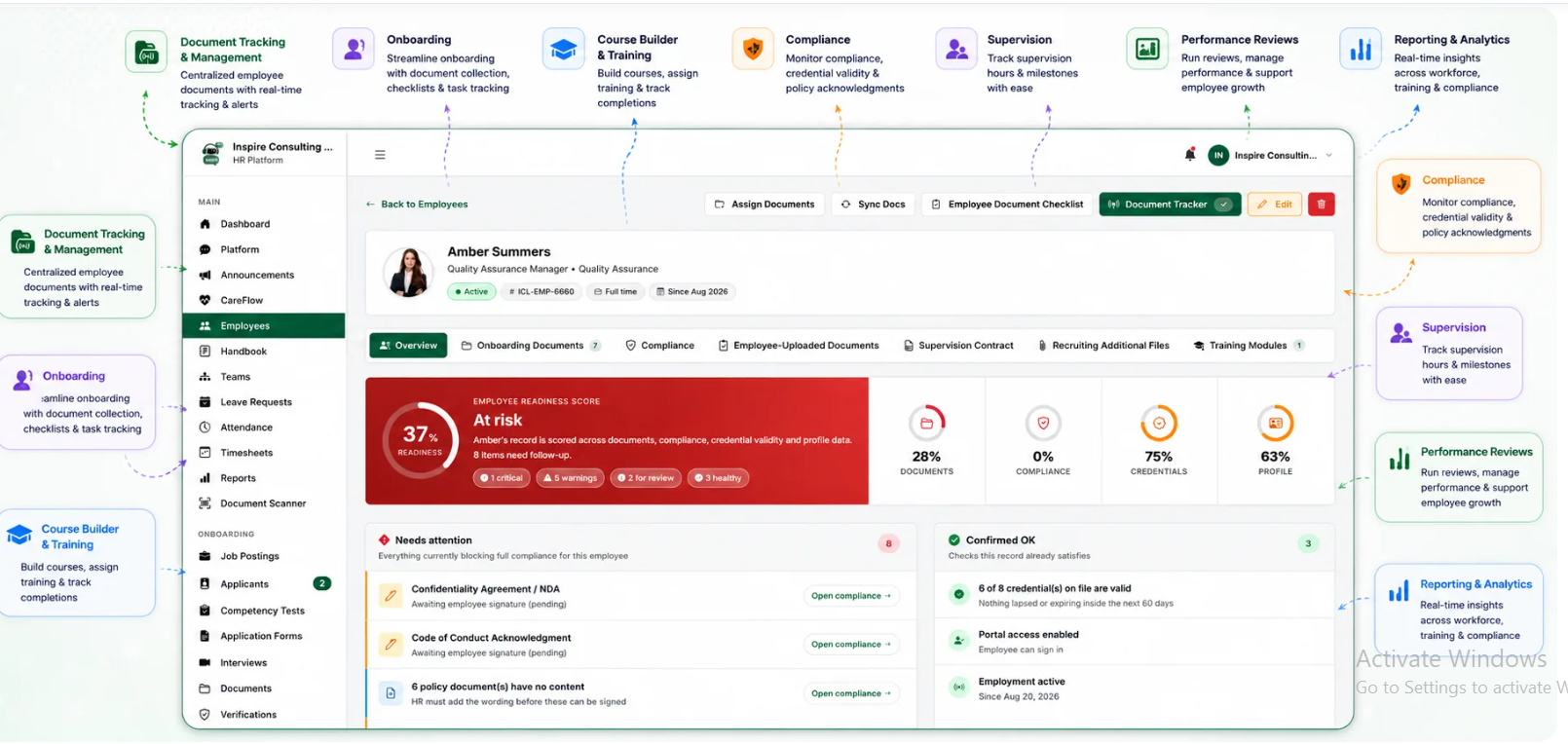
BUAMS HR is designed for behavioral health organizations that need a more structured way to manage employee documents and workforce requirements.
The platform's workforce management approach brings together employee records, document tracking, credential monitoring, onboarding, training, compliance-related workflows, clinical supervision, and reporting.
This can help organizations maintain a more centralized view of employee documentation rather than relying entirely on disconnected spreadsheets and folders.
When evaluating BUAMS HR, ask how the available document tracking features support your organization's requirements, including expiration monitoring, verification, employee follow-up, and record retrieval.
You can also review the guide to behavioral health HR reporting and analytics to understand why organized workforce information matters as an organization grows.
Employee Credential Tracking Checklist
Use this checklist to review your current process:
- Have we identified the documents required for each role?
- Is each document connected to the correct employee record?
- Are expiration dates recorded accurately?
- Is there a clear process for verifying credentials?
- Are upcoming expirations reviewed regularly?
- Are reminders assigned to specific people?
- Can HR distinguish verified records from documents awaiting review?
- Are unresolved issues escalated?
- Can authorized staff retrieve records when needed?
- Are employee documents protected by appropriate access controls?
- Is the process reviewed when roles or requirements change?
- Can we report on missing, expiring, or expired documents?
If several answers are no, the organization may benefit from standardizing its process before adding more employees or locations.
Frequently Asked Questions
What is credential tracking software for behavioral health organizations?
Credential tracking software helps organizations record, organize, and monitor employee licenses, certifications, and other required documents. Depending on the system, it may include expiration reminders, verification status, reporting, and centralized employee records.
Which employee credentials should a behavioral health clinic track?
The required records depend on employee roles, professional requirements, jurisdiction, program structure, and applicable contracts or regulations. Organizations should establish a role-based inventory instead of assuming that the same checklist applies to every employee.
How often should employee credentials be reviewed?
Organizations should establish a review schedule based on the credential type, renewal timeline, and applicable requirements. Expiration monitoring should happen early enough to allow appropriate follow-up and verification.
Can a spreadsheet be used for credential tracking?
Yes. A spreadsheet can work for a small organization with a manageable number of records, provided that responsibilities, access controls, review schedules, and follow-up procedures are clear. Software may become useful when the volume or complexity of records increases.
Does credential tracking software guarantee compliance?
No. Software can help organize records, flag expiration dates, and support follow-up. The organization must still identify applicable requirements, verify documents appropriately, and take action when records are missing or no longer valid.
Final Thoughts
Employee credential tracking is an ongoing workforce responsibility, not a one-time document collection exercise.
Behavioral health organizations can improve their process by creating a role-based credential inventory, verifying records when they are received, monitoring expiration dates, assigning follow-up responsibilities, and reviewing documentation regularly.
As the workforce grows, a centralized system can make it easier to identify missing information and maintain visibility into employee records.
BUAMS HR offers a platform for organizing workforce documentation and related HR processes. Review its capabilities against your requirements to determine whether it is a suitable fit for your organization.
Explore BUAMS HR to learn more about its approach to behavioral health workforce management.